Polycam's Floor Plan tool, a feature that instantly generates 2D floor plans from LiDAR captures, was gaining traction among our target customers. Given its success, I was tasked with designing Spatial Report, a closely related feature that presented all spatial data from the floor plans into an exportable PDF file with room-by-room information laid out in data tables.
I researched publicly available competitor products to inform the design direction and invited the team to discuss which features were most compelling.
Through user interviews and usability tests, as well as conversations with potential users in relevant industries, I gained a deeper understanding of their use cases, industry-specific needs, and the nuanced factors that could make or break the product.
To ensure launch success, I included a blurred floor plan preview—featuring the 2D floor plan for Pro users (the cheaper paid tier that had access to basic floor plans) and a generic sample report for free users (no access to floor plans at all)—so everyone would understand what "Spatial Report" meant.

Usability testing on Report prototype
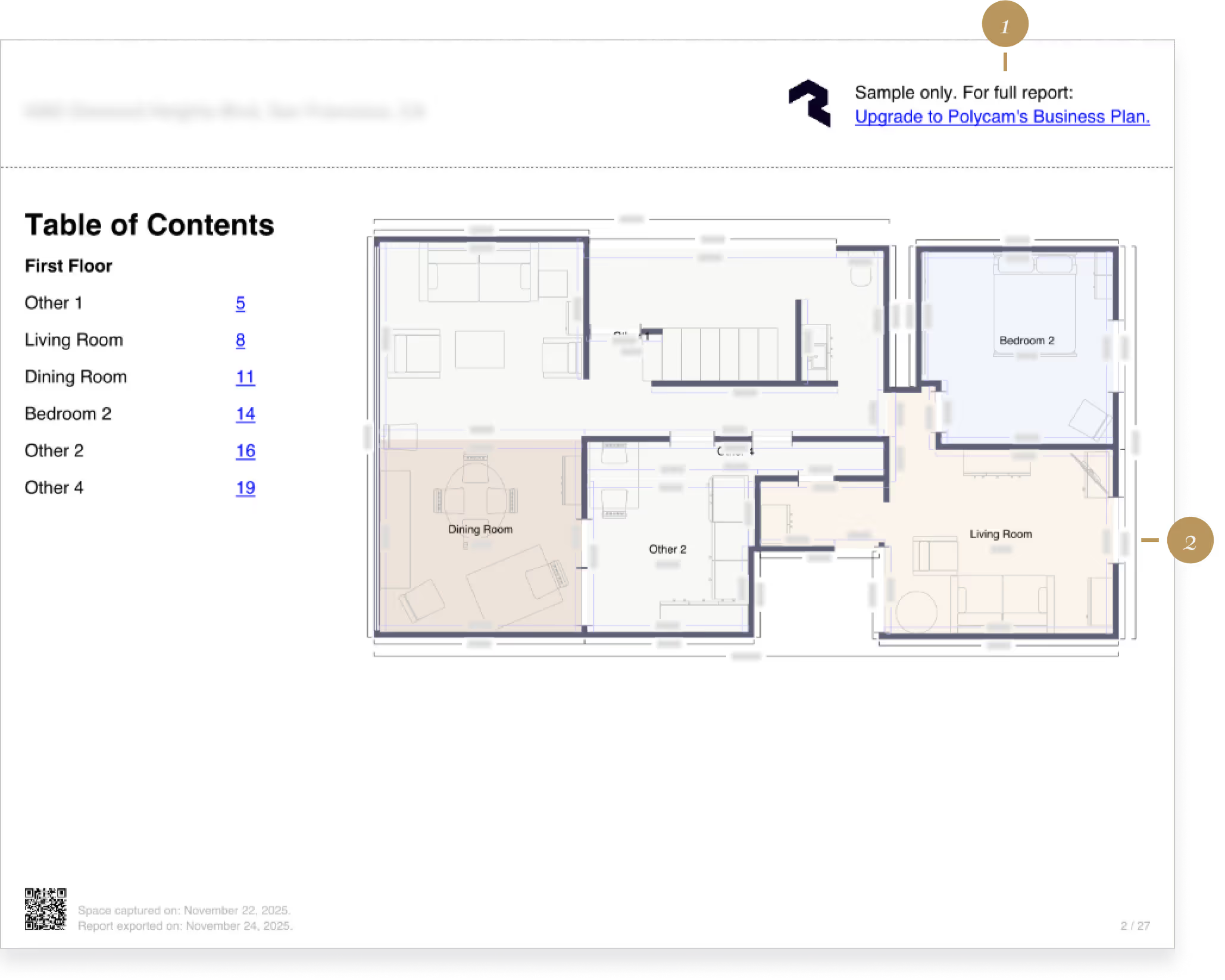
A page of the Spatial Report pdf as shown to Pro customers.
A link to the pricing page is added to each page of the pdf for easy check out.
The dimensions are blurred — the user must upgrade to reveal.
Spatial Report converted Pro users to Business subscriptions far better than other features. The partially concealed preview was working—users could see enough value to upgrade. However, Free-to-Pro conversion remained weak because free users still encountered a static paywall with no preview at all.
As I transitioned from senior designer to product manager (Growth), I became responsible for driving growth by increasing self-serve Business and Enterprise subscriptions. There were many ways to accomplish this, but we needed to prioritize our efforts.
Without a dedicated growth engineering team or marketing partners, I ran bi‑weekly PLG syncs with leadership and developers to define priorities and ensure our PLG work was properly resourced.
After discussions with leadership, our team's first priority was to standardize and improve Polycam's paywalls. I created a data table tracking paywall traffic and conversion rates at each entry point to identify the greatest opportunities for revenue uplift.
The most impactful area? Pro and Business upgrades from the Free tier for Floor Plan and Spatial Report—two similar features.
As I investigated further, I realized we had an opportunity for massive improvement through one small engineering intervention we could test quickly and confidently, rather than endlessly iterating on paywall designs with little certainty.
When we first released Spatial Report, we didn't show free users the personalized, blurred preview that we show Pro users because floor plans featured inside the report is a Pro feature.
But the preview worked so well for Pro users that we wondered: what if we showed free users their floor plan with blurred dimensions? They'd see the shape and layout, but the measurements—the most valuable part—would stay hidden.
Our hypothesis:
"Even if we disclose more gated features to lower-tier users, more people will convert out of frustration with workarounds than they would without understanding the paid feature's value."

A/B test control: Free users get a generic, static promotional screen as soon as they tap on Floor Plan.
The experiment validated our hypothesis and showed meaningful improvements in conversion performance. New upgrade funnels emerged that the static paywall had previously blocked. The results validated our hypothesis, so we safely shipped this improvement.
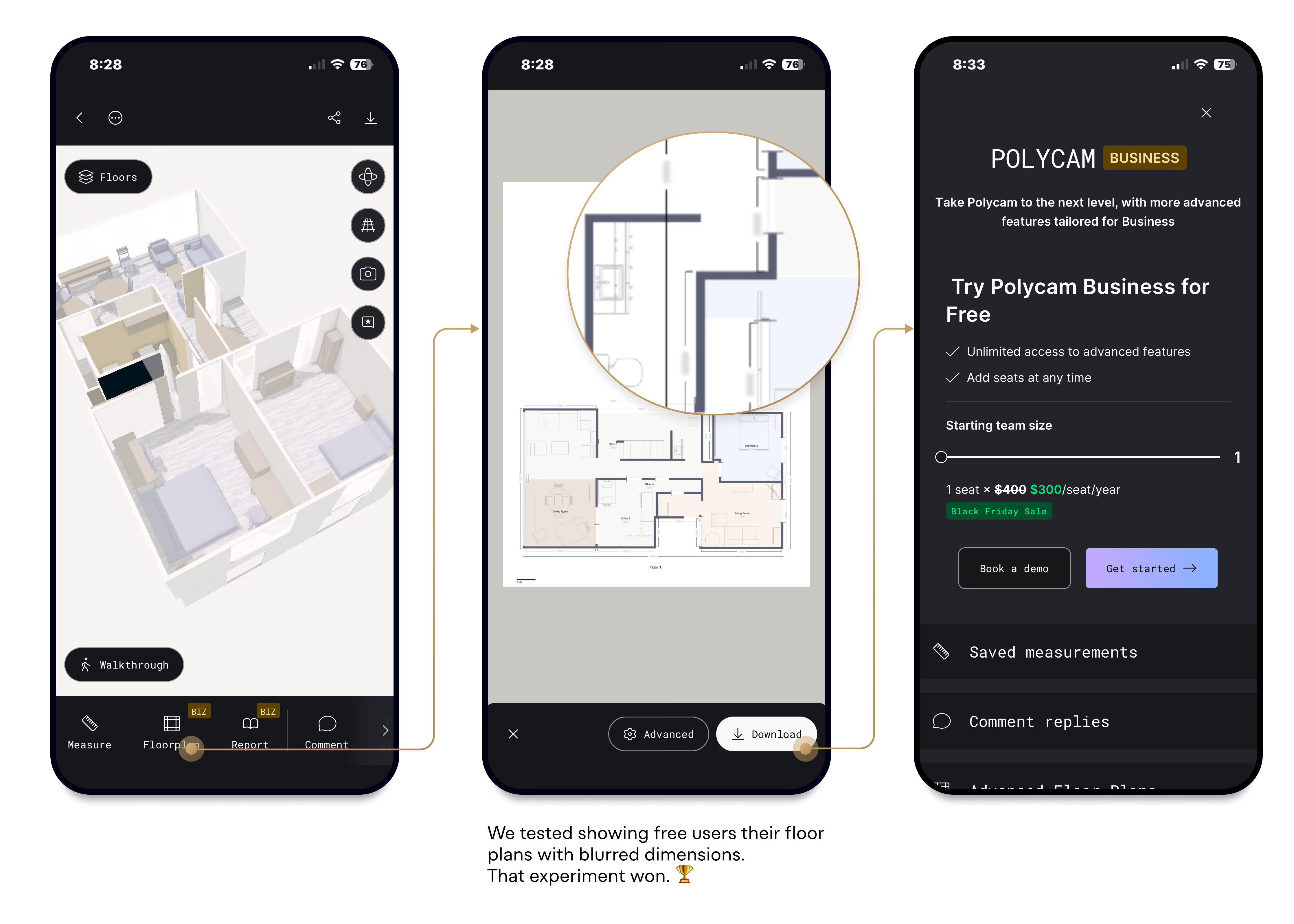
A/B test treatment: Showing the floor plan preview to free users
Since free users could now see blurred floor plans, we could safely introduce blurred Spatial Reports to them as well without fear that we are "revealing too much".
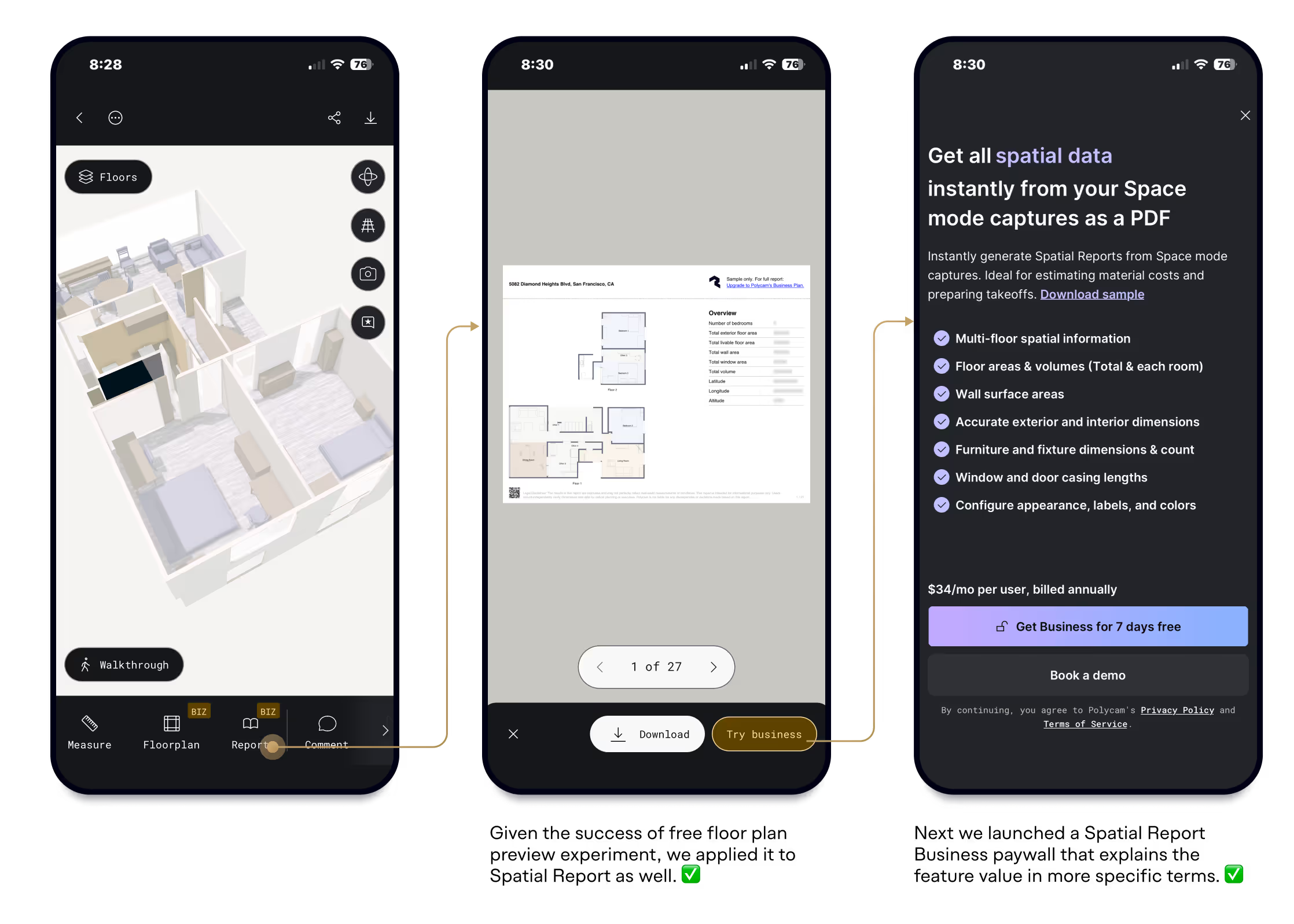
The new Spatial Report upgrade experience
Not all features are easy to discover or understand. Even after seeing sample reports and previews, users may not immediately grasp how a feature—especially one with an enigmatic name like "Spatial Report"—applies to their work.
This is where thoughtful paywall design can explain the value, now that we've improved the journey leading users there.
The new "contextual" paywall design surfaces Spatial Report–specific value propositions, a sample download link, and a large feature graphic—rather than showing a blanket list of all Business tier features. This approach explains why users should upgrade, drawing on firsthand customer knowledge from sales, CS teams, and user research.
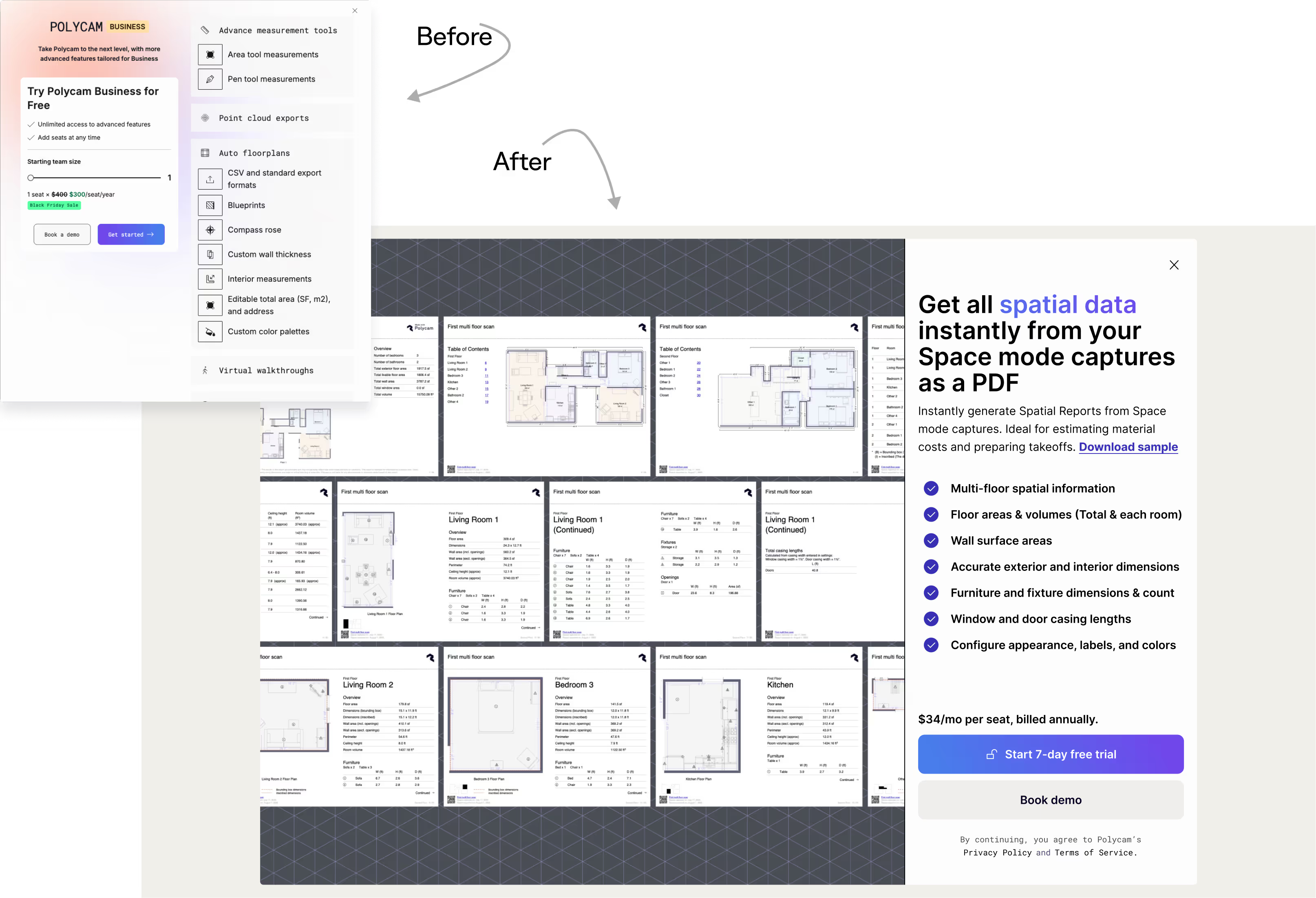
The new Spatial Report contextual paywall on desktop web
From day one, Spatial Report showed the strongest conversion performance among all feature-specific paywalls, converting Business customers at ~15% on both mobile and web—the highest of any feature gate.
Here's what was actually broken: Floor Plan had a static paywall that told users nothing. Only about 100 people per month were even seeing it. When we added the blurred preview—showing free users their actual floor plan with hidden dimensions—suddenly people knew the feature existed. Paywall views on the Free tier jumped from ~100/month to 3,100+. Combined with a 50% lift in Business conversion, Floor Plan drove 50% of self-service Business revenue and 30% more Pro subscriptions in the first month after release.
Proving this hypothesis set an important strategic precedent. The success showed that giving freemium users a taste of premium features drives stronger conversions than strictly limiting access. This gave us confidence to apply the same approach to Report and other features.
A key learning from this is that demonstrating personalized value throughout the user journey has far greater impact on conversion than endlessly optimizing paywall design alone.
Growth teams often focus narrowly on three steps around the paywall—the step before it, the click-through, and checkout. But what if we expanded our view to treat the entire app experience with the same level of attention?
In other words: what if the whole app functioned as a paywall—constantly demonstrating value and guiding users toward conversion?
— Ethan Goldspier, VP Sales and Business Development at Polycam
— Siavash Zamani, Growth Engineer at Polycam
— Wyatt Roy, Brand Marketing Specialist
— Marc Deetjen, CV Engineer at Polycam


Made in Figma + Webflow by Lai Jing Chu, 2025.
Take a peek at the website style guide.